
Somewhere in a lot of AI and creative pipelines, there's a job that looks like this: a queue of images that need to be generated, upscaled, transformed, or run through a model, on some schedule, and then the job is done until the next batch shows up. It's not a live endpoint or something that needs to answer a request in 200 milliseconds. It's a burst of parallel work that starts, runs, and finishes.
That shape of workload has a specific problem when it's forced onto standard cloud infrastructure: almost every cloud GPU pricing model is built around keeping something running, not around finishing something and stopping. You reserve an instance, and you pay for it whether the queue is full or empty. For a workload that's fundamentally about processing a batch and then going idle, that's the wrong pricing shape entirely.
This is exactly the problem a distributed, pay-per-execution GPU network is built to solve. There's a real, working example that shows what it looks like in practice.
Muhammet Altun, the 3D artist known as MHX, built a project called Bitmap: it’s a system that takes one Bitcoin block every 24 hours and expands its transaction data into a unique, animated 3D sculpture. A single Bitcoin block contains an average of 3,000 transactions; Altun’s algorithm turns that data into a sculpture built from thousands of individual cuboids, a small input turned into a large, GPU-intensive rendering job.
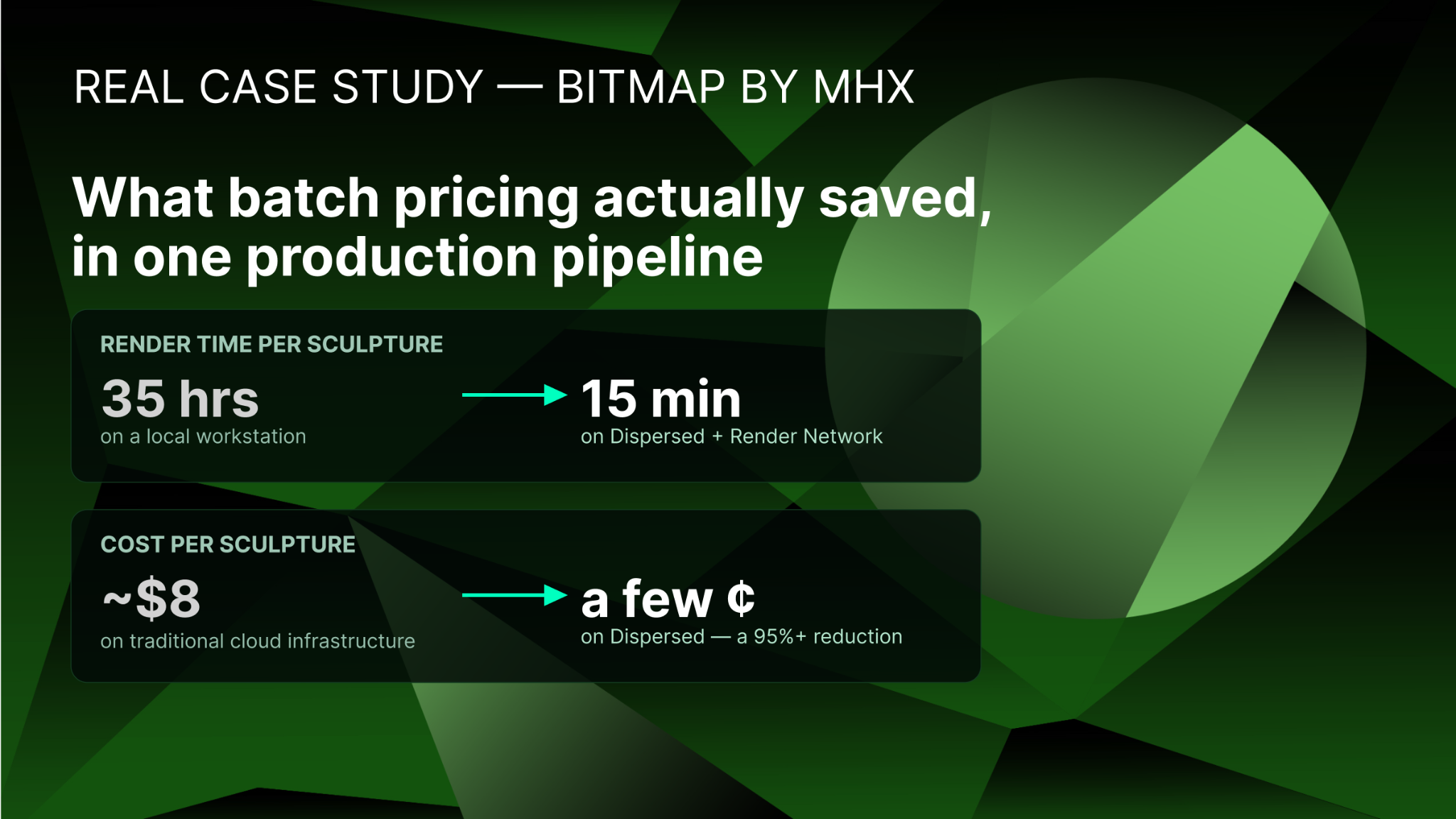
On a high-end local workstation, rendering one Bitcoin block sculpture in 4K would take about 35 hours, well past the 24-hour window the daily series required. Running it locally would not physically have been possible. Moving to a traditional cloud provider like AWS would have solved the capacity constraint but added DevOps overhead that doesn't make sense for a single daily batch job.
Altun came up with a solution whereby he packaged the rendering pipeline (Houdini for geometry construction, OctaneRender for frame rendering) into a Docker image; then he triggers it once a day with a lightweight Cloudflare Worker that submits a signed job request to Dispersed for a node with a 16-CPU core GPU, 32 GB RAM, and 16 GB VRAM. The job spins up, runs, and tears down. This happens every single day, automatically, with no standing infrastructure in between.
The result: generation time dropped from 35 hours to 15 minutes. Cost per sculpture dropped from roughly $8 on a traditional cloud to a few cents on Dispersed. That’s more than a 95% reduction. Bitmap has run this way, autonomously, every day since Jan. 1, 2026.
That's the batch image processing use case in its purest form: a recurring job, a container, a scheduled trigger, and a network that only bills for the time the job actually runs.
Every job submitted to Dispersed is one of two types, and the distinction is the reason this pricing model works for batch image workloads specifically.
A batch job runs until completion or a specified timeout, requires a `max_timeout_run_ms` value, and bills for actual execution time. It's built for exactly the kind of finite task this article is about: rendering, data processing, batch inference. It stops automatically the moment the container exits or the timeout is hit.
A persistent job, by contrast, runs indefinitely until you manually stop it. It bills to the millisecond the entire time it's running and fits things like SSH access or a live-serving development environment. If you use a persistent job for a batch workload, you're paying for idle time between runs, which defeats the entire point.
For batch image processing specifically, the batch job type is the lever that makes the economics work. You're not paying for a GPU sitting idle at 2am waiting for tomorrow's queue. You're paying for the minutes the container actually spent generating, upscaling, or transforming images, and nothing else.
The workflow follows a consistent shape whether you're generating synthetic training data, batch-upscaling a content library, or running a daily generative project like Bitmap:
1. Containerize the pipeline once. Package your image generation, upscaling, or transformation logic, along with its dependencies, into a standard Docker image. This is a one-time setup cost; Altun reported 1:1 parity between his local environment and the actual Dispersed nodes, which meant testing locally translated directly to production behavior.
2. Specify the job's hardware requirements. Submit the job with the GPU, RAM, and VRAM specs the workload actually needs. No more, no less. A lightweight upscaling job and a heavier generative pipeline have very different requirements, and specifying accurately avoids overpaying for hardware headroom you don't need.
3. Set the job type to batch, with a timeout. This is the step that ensures the job bills only for execution time and shuts down automatically once the container finishes or hits the specified `max_timeout_run_ms`.
4. Trigger it however fits your workflow. A one-off run can go straight through the API or whatever UI setup supports it (in Dispersed’s case, the Console). A recurring job—daily, hourly, or on whatever cadence your batch queue fills up—can be triggered by a lightweight scheduler (a Cloudflare Worker, a cron job, or any external trigger that calls the API with a signed request), like Bitmap does.
5. Convert repeated payloads into a job recipe. If you find yourself resubmitting the same configuration for every batch run, that's the signal to build a reusable job recipe. It’s a preconfigured template bundling your hardware requirements and container settings, so future runs need only minimal new input rather than a full resubmission.
6. Let the job tear down automatically. Once the container completes, the batch job ends and billing stops. There’s no manual cleanup or standing instance left running by accident.
A standing GPU instance on a traditional cloud provider bills for every hour it exists, regardless of whether a batch job is actively running on it. It runs 24 hours a day, whether your queue has 10,000 images or zero. A batch job on a pay-per-execution network bills only for the minutes the container is actually processing.
The Bitmap numbers make this concrete without needing a hypothetical: a job that would cost about $8 per run on traditional cloud infrastructure actually costs a few cents per run on a decentralized network. That is because the pricing model matches the actual shape of the workload, a short burst of intensive compute followed by nothing. For any batch image pipeline running on a recurring schedule, that gap compounds daily, weekly, and monthly in a way a single price comparison doesn't fully capture.
Batch processing on a distributed, pay-per-execution network is a strong fit for scheduled or periodic image jobs: batch upscaling runs, synthetic dataset generation, nightly renders, recurring generative art pipelines, or any workload that runs, finishes, and waits for the next trigger.
It's a weaker fit for a workload that needs to respond to requests in real time with consistent low latency. A live image-generation API serving user requests as they arrive, for instance, is a better match for a persistent job (or a dedicated inference setup) than a batch job that spins up and down between requests.
If your queue fills up on a schedule and finishes in minutes, this is the model built for exactly that. If you're serving live requests around the clock, that's a different job type.
The fastest path from here is a container and a job spec: package your pipeline, decide on the hardware tier the workload actually needs, set the job type to batch with an appropriate timeout, and submit it through the UI or the API. If this is a recurring job, save it as a recipe the first time so every future run is a smaller lift than the last.


